


SinricPro uses REST for its API. This means it uses JSON for data exchange and follows common HTTP practices for communication.
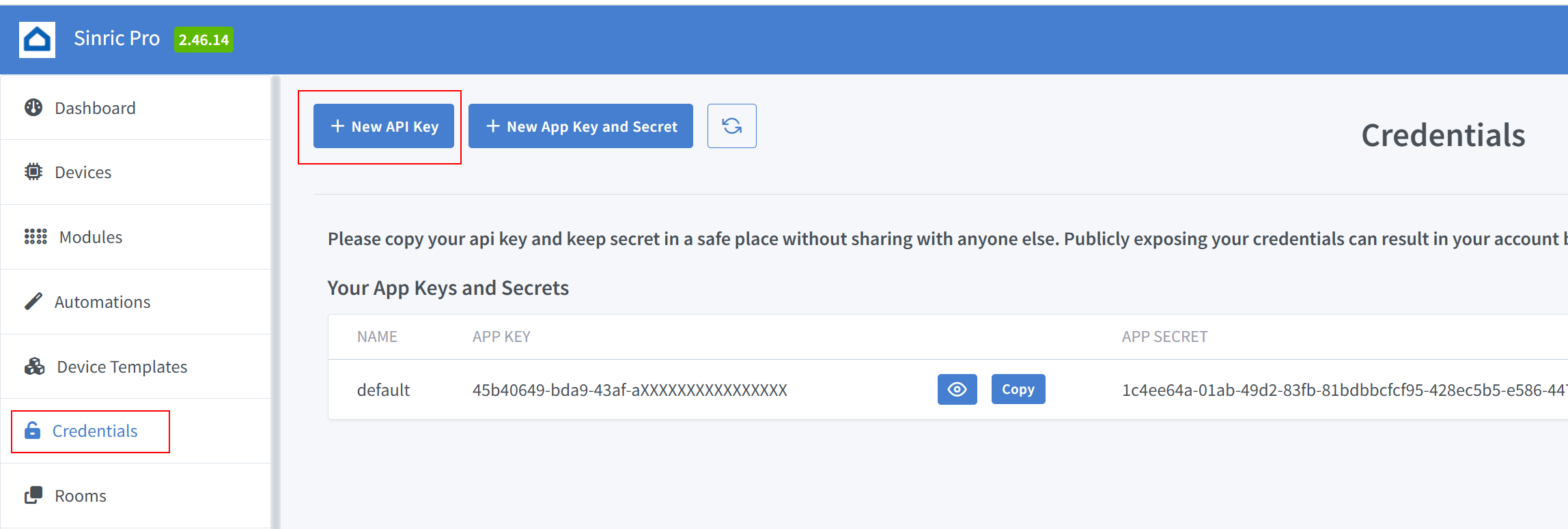
To interact with the SinricPro API, you’ll need an API key. You can create and manage your API keys within the SinricPro Dashboard under the Credentials section. To create a new API Key click here
Request
curl -H "X-SINRIC-API-KEY: {YOUR-API-KEY-HERE}" https://api.sinric.pro/api/v1/devices
Response
{
   "success":true,
   "devices":[{
      "name":"TV",
      ....
   }]
}
Request
curl -H "X-SINRIC-API-KEY: {YOUR-API-KEY-HERE}" https://api.sinric.pro/api/v1/devices/{device_id}
Response
{
   "success":true,
   "device":{
      "name":"TV",
      ....
   }
}
Request
curl --location 'https://api.sinric.pro/api/v1/devices/{device_id}/action' \
--header 'X-SINRIC-API-KEY: {YOUR-API-KEY-HERE}' \
--header 'Content-Type: application/json' \
--data '{ "type": "request", "action": "setPowerState", "value": "{\"state\":\"On\"}" }'
Note: value is a string. Use JSON.stringify()
Response
{
    "success": true,
    "message": "OK. Your message has been queued for processing."
}
SinricPro prioritizes speed and avoids blocking. All command requests are queued and handled asynchronously, meaning the response might not be immediate. To receive confirmation or continuously monitor device status, subscribe to updates through our SSE (Server-Sent Events) endpoint.
curl -N --http2 -H "Accept:text/event-stream" -H "X-SINRIC-API-KEY: {YOUR-API-KEY-HERE}" https://sse.sinric.pro/sse/stream
Response
 % Total    % Received % Xferd  Average Speed   Time    Time     Time  Current
                                 Dload  Upload   Total   Spent    Left  Speed
  0     0    0     0    0     0      0      0 --:--:--  0:00:05 --:--:--     0
{"event":"deviceConnected","device":{"name":"lightbulb","id":"660a7edf061ee8c78078c5ab"}}
....
{"event":"deviceDisconnected","device":{"name":"switch2","id":"660a6c3d061ee8c78078bf3e"}}
...
{"event":"deviceMessageArrived","device": {"name":"switch2","id":"660a6c3d061ee8c78078bf3e","powerState":"On"}}
Request
curl --location 'https://api.sinric.pro/api/v1/devices/{device_id}/action' \
--header 'X-SINRIC-API-KEY: {YOUR-API-KEY-HERE}' \
--header 'Content-Type: application/json' \
--data '{ "type": "request", "action": "setMode", "value": "{\"mode\":\"Open\"}" }'
Note: value is a string. Use JSON.stringify()
Request
curl --location 'https://api.sinric.pro/api/v1/devices/{device_id}/action' \
--header 'X-SINRIC-API-KEY: {YOUR-API-KEY-HERE}' \
--header 'Content-Type: application/json' \
--data '{ "type": "request", "action": "setRangeValue", "value": "{\"rangeValue\": 100}" }'
Note: value is a string. Use JSON.stringify()
Request
curl --location 'https://api.sinric.pro/api/v1/devices/{device_id}/action' \
--header 'X-SINRIC-API-KEY: {YOUR-API-KEY-HERE}' \
--header 'Content-Type: application/json' \
--data '{ "type": "request", "action": "DoorbellPress", "value": "{\"state\": \"pressed\"}" }'
Note: value is a string. Use JSON.stringify()
Note: capabilities like Range or Mode requires additional instanceId parameter
Range Request
curl --location 'https://api.sinric.pro/api/v1/devices/{device_id}/action' \
--header 'X-SINRIC-API-KEY: {YOUR-API-KEY-HERE}' \
--header 'Content-Type: application/json' \
--data '{ "type": "request", "instanceId" : "rangeInstance1", "action": "setRangeValue", "value": "{\"rangeValue\":41}" }'
Mode Request
curl --location 'https://api.sinric.pro/api/v1/devices/{device_id}/action' \
--header 'X-SINRIC-API-KEY: {YOUR-API-KEY-HERE}' \
--header 'Content-Type: application/json' \
--data '{ "type": "request", "instanceId" : "modeInstance1", "action": "setMode", "value": "{\"mode\":\"cool\"}" }'
Note: value is a string. Use JSON.stringify()
Request
curl --location 'https://api.sinric.pro/api/v1/devicess/find' \
--header 'X-SINRIC-API-KEY: {YOUR-API-KEY-HERE}' \
--header 'Content-Type: application/json' \
--data '{ "name" : "TV" }'
Response
{ "success":true,"devices": [ {"name": "TV"} ] }
Complete API endpoints are available here
Looking for more examples ?